Python setup
Python setup#
Linux(amd64 and arm64) and macOS (arm) is supported.
Step-by-step guide#
-
In case you are not yet connected, connect to my Wi-Fi network - scan the Wi-Fi QR code, or use SSID: Matter_Raspi_LED password: CUJO.AI!
-
On Linux:
sudo apt install -y \
  git gcc g++ pkg-config ninja-build unzip \
  python3-venv python3-dev python3-pip \
  libssl-dev libdbus-1-dev libglib2.0-dev libavahi-client-dev \
  libgirepository1.0-dev libcairo2-dev libreadline-dev
uv pip install \
  home-assistant-chip-repl==2025.7.0 \
  home-assistant-chip-core==2025.7.0 \
  home-assistant-chip-clusters==2025.7.0 \
  home-assistant-chip-repl==2025.7.0
mkdir -p credentials/development/paa-root-certs
git clone --depth 1 --filter=blob:none --sparse https://github.com/project-chip/connectedhomeip.git chip-src
cd chip-src && git sparse-checkout set credentials/development/paa-root-certs
cd ..
.venv/bin/chip-repl --trust-store chip-src/credentials/development/paa-root-certs
on macOS:
brew install gobject-introspection glib pkg-config cairo
export PKG_CONFIG_PATH="$(brew --prefix)/lib/pkgconfig:$(brew --prefix gobject-introspection)/lib/pkgconfig:$(brew --prefix glib)/lib/pkgconfig${PKG_CONFIG_PATH:+:$PKG_CONFIG_PATH}"
echo 'pygobject; sys_platform == "linux"' > overrides.txt
uv pip install --override overrides.txt \
  home-assistant-chip-repl==2025.7.0 \
  home-assistant-chip-core==2025.7.0 \
  home-assistant-chip-clusters==2025.7.0 \
  home-assistant-chip-repl==2025.7.0
mkdir -p credentials/development/paa-root-certs
git clone --depth 1 --filter=blob:none --sparse https://github.com/project-chip/connectedhomeip.git chip-src
cd chip-src && git sparse-checkout set credentials/development/paa-root-certs
cd ..
.venv/bin/chip-repl --trust-store chip-src/credentials/development/paa-root-certs
-
Start chip-repl
-
Pick a station number currently not used by anyone else. Touch the chosen station number on the touchscreen.
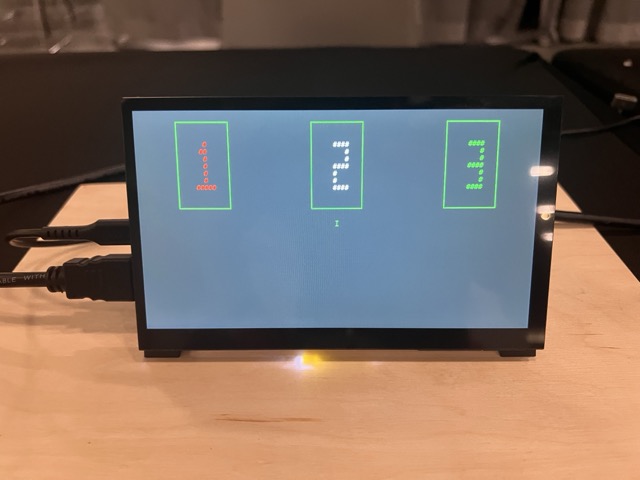
This will put the Matter device into factory reset/commissioning mode.
- Use the following commands in your terminal.
await devCtrl.DiscoverCommissionableNodes()
For the next command, you need to decode the QR code and use that string.
await devCtrl.CommissionWithCode("<pairingcode_starting_with_MT:>", 110)
In case you wonder what 110 in the command is, 110 is the node-id, an identifier a client chooses for “client things”. You can change this value as you want, but all the example documentations use this one. Just remember to use the same value in pairing and toggle commands.
- Toggle the LED on/off with:
await devCtrl.SendCommand(110, 1, Clusters.OnOff.Commands.Toggle())
Before you leave …#
Don’t forget to fill out our feedback form