Ubuntu setup
Guide to blink the LEDs via Ubuntu#
Please don’t forget to remove the device after you finish the setup and playing with the LED! Pretty please :) Probably most parts of this guide work with your distro if “snap” is available. Only tested with Ubuntu.
Step-by-step guide#
- In case you are not yet connected, connect to my Wi-Fi network - scan the Wi-Fi QR code, or use SSID: Matter_Raspi_LED password: CUJO.AI!
Warning: If Ubuntu is in a VM, use bridged networking!
- Install dependencies
sudo apt update
sudo apt install avahi-daemon # for DNS-SD
sudo snap install chip-tool
If snap is not available, you can download an unsigned statically linked binary: x64 arm64
- Pick a station number that is not currently used by anyone else. Touch the chosen station number on the touchscreen.
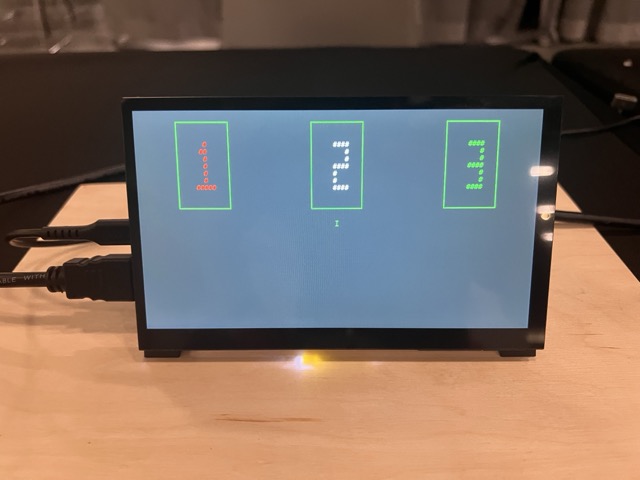
This will put the Matter device into factory reset/commissioning mode.
Optionally you can scan for commissionable devices which already have network access:
chip-tool discover commissionables
To commission the device, use:
chip-tool pairing code 110 Manual pairing code
example: chip-tool pairing code 110 0……336
In case you wonder what 110 in the command is, 110 is the node-id, an identifier a client chooses for “client things”. You can change this value as you want, but all the example documentations use this one. Just remember to use the same value in pairing and toggle commands.
If this command is not working due to “Error on commissioning step ‘AttestationVerification’” and you are using my binaries, check the notes in step 2 again …
You can get information about the device like:
chip-tool basicinformation read vendor-name 110 0
chip-tool basicinformation read product-name 110 0
To get a list of available attributes, run:
chip-tool basicinformation read
- Toggle the LED on/off with: Turn on:
chip-tool onoff toggle 110 1
Turn off:
chip-tool onoff toggle 110 1
Explanation: “onoff toggle … 1” means “toggle”.
Before you leave …#
- Once you finish playing with the device, you can unpair the device (optional). Remove the accessory from the chip-tool.
chip-tool pairing unpair 110
FAQ#
- I have Arch Linux / Hannah Montana Linux / Solaris / VMS / IBM i / LineageOS / TempleOS / Multics / GEOS / Windows Subsystem for Linux with me. Can I still play this demo?
Yes! Feel free to figure out for yourself how to do that :) Github
Pro tip: if you have avahi-daemon in your distro, most things will probably work just like in this demo. However, I did not test it.
Don’t forget to fill out our feedback form