Unlock the Signal
Unlock the Signal#
Category: IoT / Wireless / Embedded Hardware Challenge Difficulty: Easy -> Hard (4 progressive stages)
What is this?#
The device has two motorized flaps hiding printed flag sections. Solve a stage, get credentials for the next one. Four stages total. A small OLED shows the last piece once you get there.
Hardware#
| Component | Role |
|---|---|
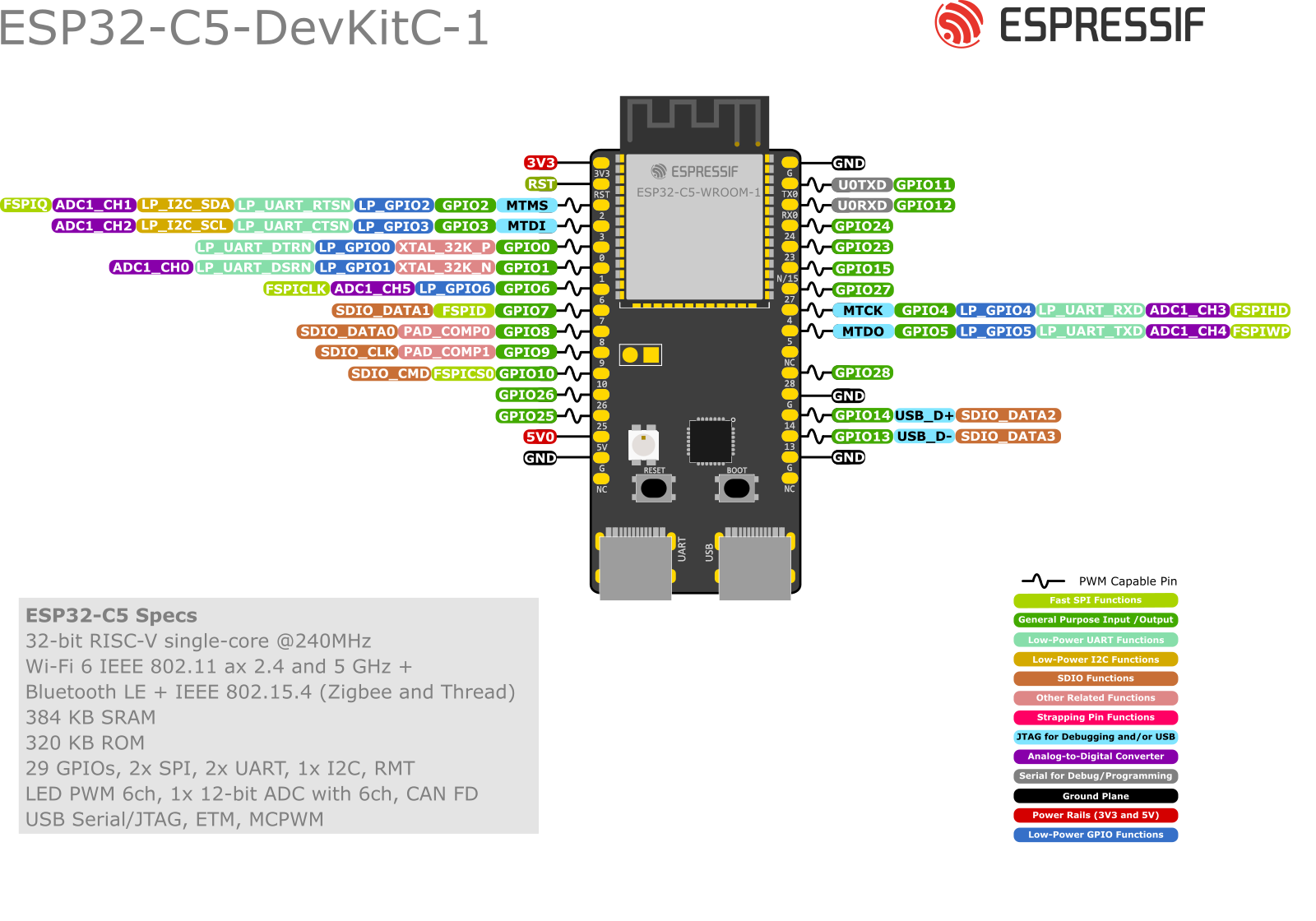
| ESP32-C5 (DevKitC-1 v1.2) | Primary: 5 GHz WiFi AP, BLE GATT, CoAP/CoAPS server, Thread Border Agent, stepper + OLED |
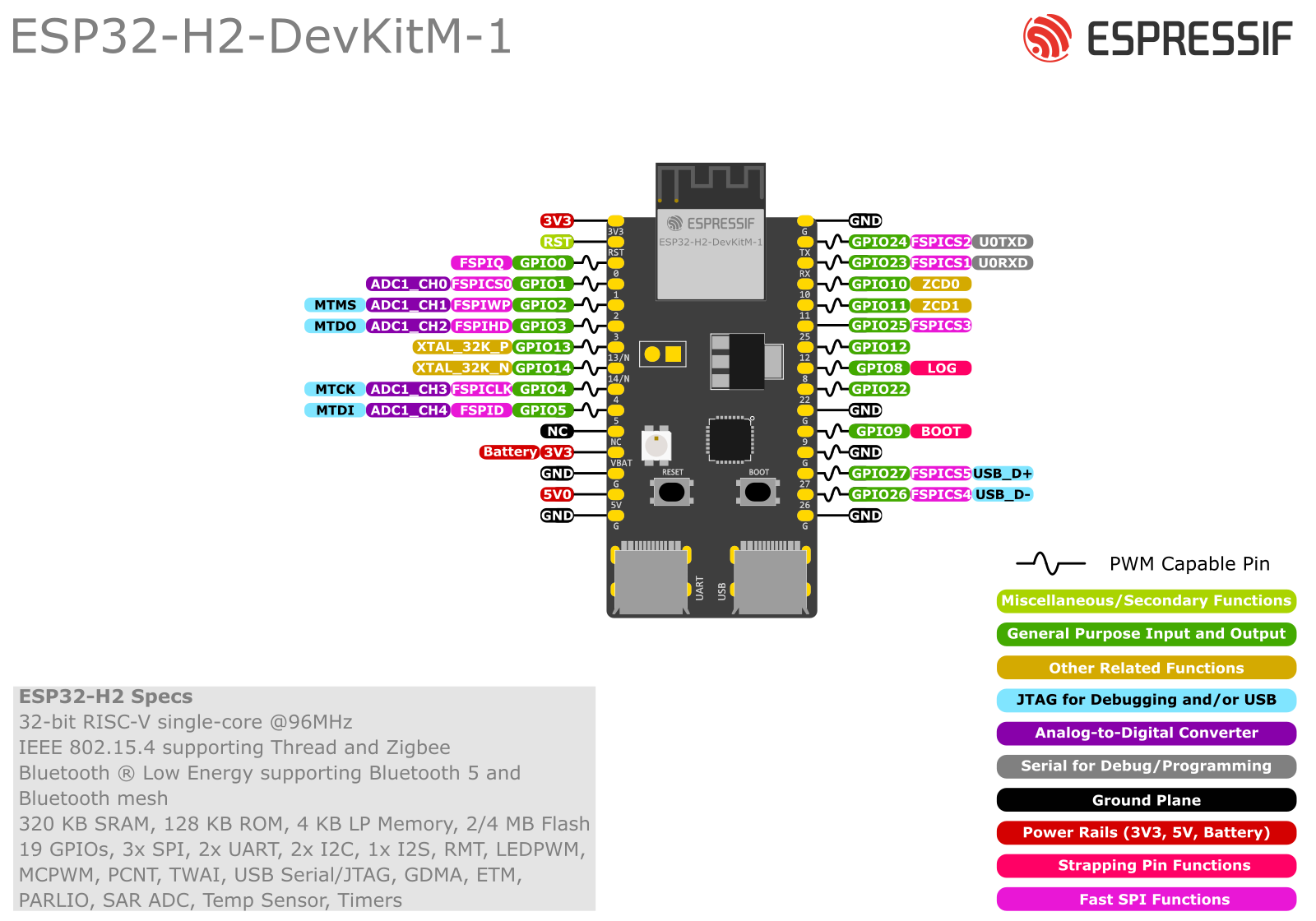
| ESP32-H2 (DevKitM-1 v1.2) | Radio Co-Processor: hosts the C5’s Thread 802.15.4 radio via Spinel/UART; no app logic |
| 2x 28BYJ-48 stepper + ULN2003 | Flap motors that uncover flag sections 1 and 2 |
| SSD1306 0.96" I2C OLED | Shows stage progress; flag sections appear on screen as stages complete |
Pinouts:
Network#
- WiFi AP on the C5 (5 GHz); join this to reach all CoAP endpoints
- CoAP plain on port 5683, CoAPS (DTLS) on port 5684, both at
192.168.9.123 - HTTP file server on port 8080 (firmware binary, Stage 4 pcap)
- Thread Border Agent advertised via mDNS (
_meshcop._udp) on the WiFi network
Stage 1: BLE GATT#
Transport: Bluetooth Low Energy | Difficulty: Easy
Scan for the device over BLE. The PIN comes from the MAC address, not a sticker. Pair with the computed PIN, then read the locked characteristic for Stage 2 credentials.
GATT characteristics#
| UUID | Access | Returns |
|---|---|---|
| UUID-A (Hint) | Read, no pairing | PIN digit range (e.g. “digits 2-7 only”); re-randomised each boot |
| UUID-B (Warning) | Read, no pairing | “PIN single-use. Burns after 10 fails.” |
| UUID-C (Attempts) | Read, no pairing | “Attempts remaining: N/10” – live fail counter |
| UUID-D (Secret) | Read, requires PIN pairing | CoAP endpoints, phase2_open token, Thread dataset TLV, WiFi-derivation haiku hint |
PIN derivation#
The PIN comes from the last 3 bytes of the BLE MAC, which the device broadcasts in its advertisement. For each byte, compute (mac_byte % 6) + base, where base is the lower bound shown in UUID-A. Format each result as 2 decimal digits and concatenate.
Example: MAC ends DE:AD:BE, UUID-A says “digits 2-7” -> base=2 -> (0xDE%6)+2=4, (0xAD%6)+2=3, (0xBE%6)+2=2 -> PIN 040302
Don’t guess. Ten wrong attempts lock the device and need an organiser reset.
Linux: The default
bluetoothctlagent (DisplayYesNo) triggers a Just Works pairing, which the device rejects. Switch to the KeyboardOnly agent before pairing:[bluetooth]# agent KeyboardOnly [bluetooth]# default-agentmacOS, Android, and Windows ask for the PIN automatically without this step.
Tools: bluetoothctl, nRF Connect, Python bleak
Stage 1 step-by-step, click to reveal
- Scan for the BLE device named
CTF-NODE-01. - Connect without pairing. Read UUID-A for the digit range. UUID-B and UUID-C show the burn warning and remaining attempt count.
- Note the last 3 bytes of the BLE MAC from the advertisement.
- Compute the PIN:
base = lower bound shown in UUID-A digit = (mac_byte % 6) + base # for each of mac[3], mac[4], mac[5] PIN = "%02d%02d%02d" % (d0, d1, d2) - Pair using the computed PIN.
- Linux: run
agent KeyboardOnlythendefault-agentin bluetoothctl beforepair <MAC>. The device will show the PIN; type it at the prompt. Without this, the default agent produces a Just Works pairing that the device rejects with “Insufficient Authentication”. - macOS / Android / Windows: the PIN prompt appears automatically.
- Linux: run
- Read UUID-D (now unlocked): returns the CoAP base URL, the
?????token, the Thread dataset as a base64 TLV blob, and a haiku hint about the WiFi password.
Stage 2: CoAP Plaintext#
Transport: CoAP UDP 5683 over WiFi | Difficulty: Easy-Medium
Work out the WiFi password from the Thread dataset, get on the network, move flap A to position 45, grab the firmware, and pull the DTLS PSK out of it.
CoAP resources#
| Resource | Method | Auth | Notes |
|---|---|---|---|
| GET /status | GET | None | Flap A/B positions as JSON |
| GET /firmware | GET | token | Token via CoAP option 2048 or ?token=?????; returns firmware URL |
| POST /servo/a | POST | None | Body is the angle; only 4? accepted; wrong value returns 4.03 |
| GET /flag/hint | GET | None | Only when flap A is at 4?; returns the DTLS stage hint |
The token is a CoAP option, not an HTTP header. With libcoap:
coap-client -O 2048,????? ...or append?token=?????to the URI.
WiFi password derivation#
The Thread dataset TLV from Stage 1 contains TLV type 5 (16 bytes): the Network Key. XOR the last byte with 0xFF. The full 16 bytes as lowercase hex is the WiFi password. UUID-D’s haiku says it plainly: “invert what ends the sequence”.
netkey_hex = "XXXXXXXXXXXXdeeff"  # example
ap_pass    = netkey_hex[:-2] + format(int(netkey_hex[-2:], 16) ^ 0xff, "02x")
# -> "XXXXXXXXXXXXdee00"
Firmware and DTLS PSK extraction#
The firmware is at http://192.168.9.123:8080/fw/ctf_node_v1.2.bin.
Flag text is XOR-obfuscated throughout (key 0xAA), so strings won’t show it. The DTLS PSK isn’t obfuscated though: it’s a plain 32-char lowercase hex string sitting in the binary. Run strings, filter for 32-char hex, cross off the Network Key and PSKc. One string left. That’s it.
strings firmware.bin | grep -E "^[0-9a-f]{32}$"
Physical result: Flap A opens to position 45, uncovering flag section 1.
Stage 2 step-by-step, click to reveal
- Parse the Thread dataset TLV and compute the WiFi password (see formula above).
- Join WiFi SSID
CTF-SIGNAL-01with that password. - Drive flap A:
coap-client -m post -e "45" coap://192.168.9.123:5683/servo/a - Get the firmware URL:
coap-client -m get -O 2048,????? coap://192.168.9.123:5683/firmware - Download the firmware binary from the returned URL (or directly from the address above).
- Extract the DTLS PSK with
stringsand the grep filter; pick the hex string that is not the Network Key and not the PSKc.
Stage 3: CoAPS / DTLS PSK#
Transport: CoAPS UDP 5684, DTLS PSK | Difficulty: Medium
Authenticate with the DTLS PSK from Stage 2, move flap B to -90, and collect the commissioner passphrase. That’s all this stage needs from you.
Credentials#
Identity : coaps_client
Key      : <32-char hex from Stage 2>   (pass as 0x<hex> to coap-client)
CoAPS resources#
| Resource | Method | Auth | Notes |
|---|---|---|---|
| GET /status | GET | DTLS | Flap positions JSON |
| POST /servo/b | POST | DTLS | Only -90 accepted; wrong value triggers 30s lockout |
| GET /commissioner/hint | GET | DTLS | Only when flap B is at -90; returns PSKc inputs |
| GET /commissioner/unlock | GET | DTLS | Returns unlock code while a commissioner session is active (Path A) |
| POST /commissioner/flag | POST | DTLS | Body {"code":"NNNN"}; reveals flag section 3 on OLED |
The Stage 4 pcap is served over plain HTTP, not DTLS:
http://<box-IP>:8080/stage4/capture.pcap
Physical result: Flap B opens to -90, uncovering flag section 2.
Stage 3 step-by-step, click to reveal
- Drive flap B:
coap-client -m post -u coaps_client -k 0x<psk> -e "-90" coaps://192.168.9.123:5684/servo/b - Get the Stage 4 inputs:
Returns:coap-client -m get -u coaps_client -k 0x<psk> coaps://192.168.9.123:5684/commissioner/hintnetwork_name,xpanid,passphrase(per-box). - Download the Stage 4 pcap:
curl -o capture.pcap http://192.168.9.123:8080/stage4/capture.pcap
Stage 4: Thread Commissioner#
Transport: Thread MeshCoP (live) or Wireshark pcap (fallback) | Difficulty: Hard
Take the passphrase from Stage 3 and derive the Thread PSKc. From there you have two options: petition the live Border Agent (Path A), or decrypt the included pcap (Path B). Both give you a 4-digit code. POST it and the OLED lights up with the last section.
PSKc derivation (both paths)#
Thread PSKc is PBKDF2 with AES-CMAC-128, not HMAC-SHA256. The salt is the ASCII string "Thread" followed by the network name and extended PAN ID bytes. 16384 iterations, 16 bytes out.
Thread PSKc per spec:
  PSKc = PBKDF2(prf=AES-CMAC-128,
                password=Commissioner Passphrase,
                salt="Thread" || Network Name || Extended PAN ID,
                iterations=16384,
                dkLen=16)
python3 derive_pskc.py --passphrase "<passphrase from Stage 3>"
# prints PSKc hex, DTLS PSK confirmation, and the 4-digit unlock code
Find the Border Agent (Path A)#
Run the mDNS lookup to get the Border Agent IP and port. It won’t be port 5684.
dns-sd -B _meshcop._udp        # macOS
avahi-browse -r _meshcop._udp  # Linux
Path A: live commissioner, click to reveal
cat > /tmp/commissioner_cfg.json << 'EOF'
{"Id":"player","PSKc":"<pskc_hex>","KeepAliveInterval":30}
EOF

commissioner-cli /tmp/commissioner_cfg.json
> start <BA-IP> <BA-port>
> active       # wait for: true
Keep commissioner-cli running while you fetch /commissioner/unlock from a second terminal. Exit only after you have the code. The session drops the instant you quit.
coap-client -m get -u coaps_client -k 0x<psk> coaps://192.168.9.123:5684/commissioner/unlock
# returns: {"code":"NNNN"}

coap-client -m post -u coaps_client -k 0x<psk> \
  -e '{"code":"NNNN"}' coaps://192.168.9.123:5684/commissioner/flag
Path B: pcap decryption, click to reveal
- Open
capture.pcapin Wireshark. - Edit -> Preferences -> Protocols -> DTLS.
- Pre-Shared Key:
coaps_client,<DTLS PSK hex>(the 32-char hex from Stage 2, NOT the PSKc). - Filter:
coap.code == 69 && udp.port == 5684. - Read
{"code":"NNNN"}from the CoAP payload.
coap-client -m post -u coaps_client -k 0x<psk> \
  -e '{"code":"NNNN"}' coaps://192.168.9.123:5684/commissioner/flag
Result: The OLED shows flag section 3. Put all three sections together for the full flag.
Stage summary#
| Stage | Protocol | Difficulty | Physical result |
|---|---|---|---|
| 1 BLE GATT | Bluetooth LE | Easy | – |
| 2 CoAP | CoAP UDP 5683 | Easy-Medium | Flap A to 45 -> section 1 |
| 3 CoAPS | DTLS PSK 5684 | Medium | Flap B to -90 -> section 2 |
| 4 Commissioner | Thread MeshCoP / pcap | Hard | OLED -> section 3 |
Flag format: FLAG{...}, three physical sections combined.